

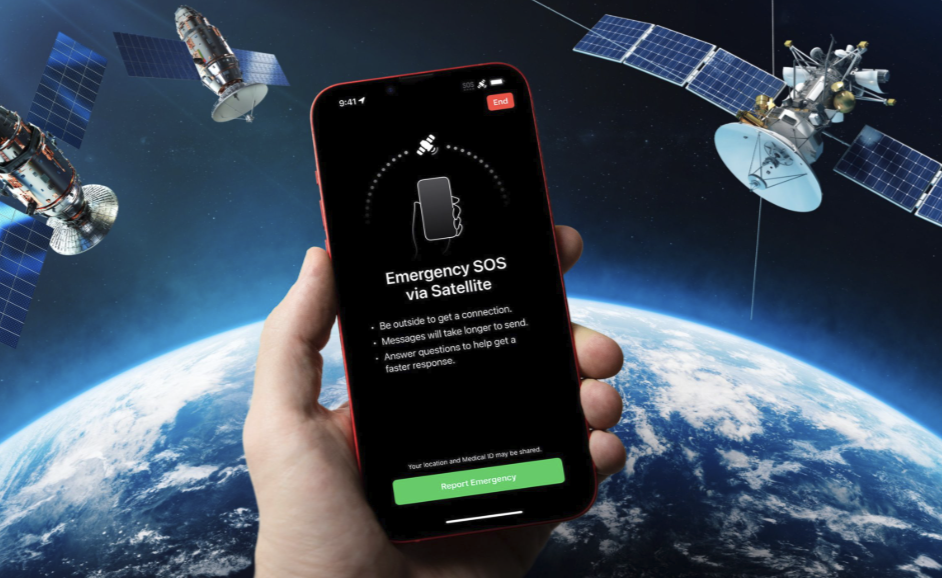
Many phones can now send a short message or an emergency request through a satellite when no mobile network is available. This matters to ordinary people because hikers, drivers on remote roads, sailors and families in rural areas all spend time where towers are far away.
In this article we will explore how phone-to-satellite messaging works, what it can and cannot do, how emergency requests are handled, what limits to expect, and how to prepare before your next trip into the wilderness.
Satellite messaging fills a gap that towers cannot reach
Ordinary mobile coverage depends on towers, and towers are built where enough people live, work or drive to make them worthwhile. Big parts of the planet have no coverage at all, including mountains, deserts, forests, remote coastlines and open water. Even in well-connected countries, a canyon, a valley or a long stretch of rural road can leave a phone showing no bars. Satellite messaging was
created to cover those gaps with a basic link when everything else is out of reach.
For most of mobile history, reaching a satellite required special equipment. Satellite phones with large antennas, handheld messengers and emergency beacons all served people who worked or traveled in remote places, but they cost extra and had to be carried separately. Many travelers did not own one, so a sprained ankle or a broken-down car in a remote region could turn into a serious situation. Putting a basic satellite link inside the phone you already carry changes that picture, because the device is usually in your pocket at the moment you need it.
It is important to be realistic about what the feature is. A phone with satellite messaging does not become a satellite phone for long voice calls, video, web browsing or social media. It offers a narrow channel meant for short text, emergency alerts and sharing your location with trusted contacts. Think of it as a lifeline for essentials rather than a way to stay connected for fun.
The feature also does not guarantee rescue. Emergency services still need to reach you, which depends on terrain, weather, distance and the resources available in the area. A message that gets through is an excellent start, but your own preparation and caution remain your first line of defense. Nobody should take extra risks because their phone has this ability.
Satellite messaging is also different from the emergency calling that your phone already offers. A normal emergency call needs a working mobile connection and gives you a live voice conversation with a call taker. A satellite request is closer to a structured text exchange, with pauses while the signal travels and while the relay center works. That difference changes how you should behave: be ready to wait, answer questions in short phrases, and avoid assuming that silence means nobody is helping.
Who benefits most from the feature? Rural residents, anglers, campers, cyclists on long routes, road trippers and anyone who works outdoors are the obvious candidates. People who live in cities and rarely leave coverage may never use it, which is perfectly reasonable. If your trips stay close to towns and well-used roads, a charged phone and a sensible plan will usually cover your needs, and the satellite option remains a quiet backup.
Phones talk to satellites in a very different way
A phone normally communicates with a tower a few kilometers away using a strong, well-tested radio link. A satellite is hundreds or even tens of thousands of kilometers away, depending on its orbit, and the phone has a small antenna and a small battery. Making that connection work at all is an engineering achievement, and it explains why the messages are short and slow. The radio signal is weak by the time it arrives, so the system uses simple, robust coding to make sure the little information that is sent can be recovered.
Different services use different kinds of satellites. Some rely on satellites in low orbit, which move quickly across the sky and are relatively close to the ground, so a phone connects to one satellite after another as they pass overhead. Others use satellites in a much higher orbit that appear to stay in a fixed place above the equator, which means the phone must be pointed toward a particular part of the sky. Each design has trade-offs in delay, coverage near the poles and how much the phone must be aimed.
Some phones use a dedicated radio and antenna design for satellite contact, while others use the same radios as normal mobile service on special frequencies that satellite operators have been permitted to use. Newer approaches aim to let ordinary phones connect to satellites with little or no special hardware, and these are being introduced step by step in different regions and by different carriers. Because the technology and agreements are changing, you should rely on your phone maker and your carrier for what your own device supports. A friend with a different phone or plan may have a very different experience.
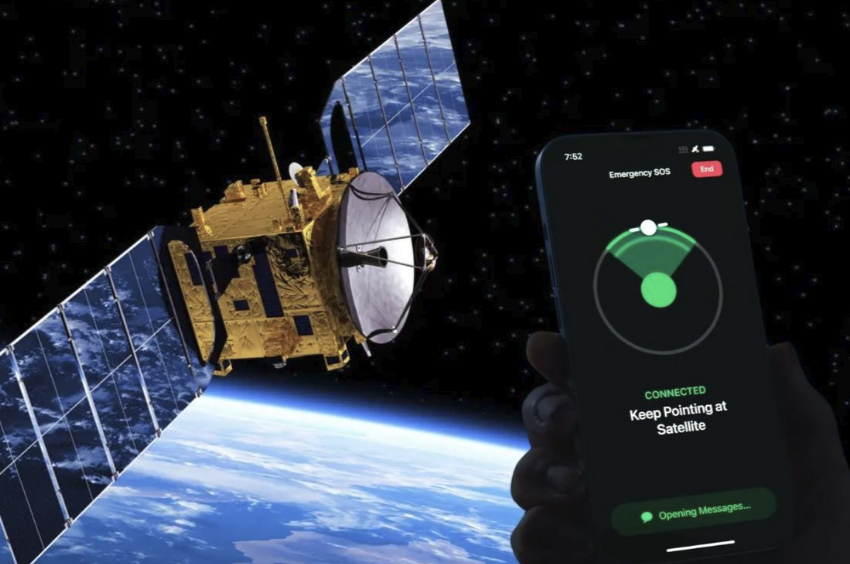
Whatever the method, satellite links are slower and less reliable than a tower connection. A message may take from several seconds to a few minutes to send, depending on conditions. The phone usually shows an on-screen guide that helps you find a satellite, and it may ask you to hold still while the message is transmitted. This is why the feature is designed for short, structured messages and not for long conversations.
Several practical features can make the exchange smoother. Some phones let you share your location with chosen contacts without contacting emergency services, which is useful for a check-in such as “arrived at camp, all well”. Some can also keep a trail of recent positions, so that a rescuer has a starting point if you lose contact. These tools depend on the phone, the plan and the region, so confirm what yours can do instead of assuming. Treat each one as a bonus on top of careful planning.
Emergency requests travel through a relay chain
When you trigger an emergency request through satellite, your phone typically asks a short set of questions first. These questions help describe the situation, for example whether you are injured, lost, trapped or in a vehicle accident, and they may ask who else needs help. Your answers, your location and sometimes your battery level and medical information are packaged into a compact message. This reduces the amount of text you must type and lets responders see the important facts quickly.
The message then travels from the phone to a satellite and down to a ground station, which passes it on to a relay center staffed by trained operators. In many systems the relay center is run by the phone maker or a partner company, and its job is to review the details and contact the right emergency service for your location. That could be a local police force, a mountain rescue team, a coast guard or an ambulance service, depending on where you are. Because emergency services are organized differently across countries, the way the relay works in one place may not match another.
Responders may then ask follow-up questions through the same channel, so keep the phone with you and watch for replies. Respond briefly and clearly, and describe landmarks, trail names or road markers that might help find you. If you can move safely to a spot with a clear sky and better shelter, do so only when it is safe, because the message may need several minutes to pass. If you are badly injured or in danger of further harm, stay put and give the clearest location you can.
It is worth saying plainly that satellite emergency messaging is for real emergencies. Using it for a test, a prank or a minor inconvenience can occupy staff and slow help for someone in danger, and in many places false emergency calls are penalized. Most phones offer a demonstration mode or a practice option so you can learn the steps without contacting anyone. Use that option, and leave the real emergency button for real emergencies.
Your own actions in the first minutes of an emergency also shape the outcome. First, make sure you are out of immediate danger, for example away from traffic, rising water, unstable ground or a fire. Second, give basic first aid to anyone hurt if you know how, and keep people warm and sheltered. Third, use the satellite feature once you are safe and have a plan to stay visible, such as bright clothing or a light. Taking a deep breath before typing helps you give accurate answers.
Clear sky and steady aim decide whether a message sends
The most common reason a satellite message fails is a blocked view of the sky. Trees, buildings, canyon walls, vehicles and even heavy cloud and rain can weaken the weak signal further. Most services recommend standing outdoors with an open view above you, and many say that dense forest can cause delays or failure. Indoors, inside a car or under thick tree cover are all poor places to try.
Hold the phone as the on-screen guide directs. The phone may show an arrow or an outline and ask you to turn slowly until it finds a satellite, then keep it steady until the transfer finishes. Avoid covering the antenna area with your hand or a thick case, and try not to wave the phone around once the link is active. If you wear gloves, a cold hand can shake, so it helps to brace your arm against your body or a solid surface.
Your position in the landscape also matters. A high point such as a ridge or a clearing usually gives a better view than the bottom of a valley, and you should consider the safety of that spot before moving. Satellites may appear in different parts of the sky depending on the design and your location, so follow the guidance on screen instead of relying on rules of thumb. If one attempt fails, move a few steps, re-aim and try again, but do not leave a safe shelter for a long search unless you must.
Weather, temperature and battery state add further challenges. Cold weather reduces battery capacity, so a phone that shows a healthy charge in a warm room may shut down quickly in freezing air. Keep the phone close to your body, inside an inner pocket, until you need it, and consider carrying a small power bank in the same warm place. If the screen dims or the phone slows down, warming it briefly often helps.
Cases and accessories can interfere with the experience in small ways. A thick, metal or magnetic case, a wallet attachment or a grip ring may partly cover the antenna or block the clear sweep of the phone. If you are going somewhere remote, test the satellite feature with your normal case on, and remove accessories that seem to get in the way. A screen protector or a waterproof pouch is usually fine, but the practice run will tell you for sure.
Coverage and cost vary by country, device and plan
Not every phone supports satellite messaging, and not every country has the feature switched on. Support depends on the phone hardware, the software version, the carrier and the regulatory approvals in each region. Even within a country, some services work only outdoors in open terrain and may exclude certain areas such as parts of the far north. Always read the maker’s list of supported regions before relying on it, and recheck it before an international trip.
Pricing models differ widely. Some makers include emergency features at no extra charge for a period after purchase, others bundle them into a carrier plan, and others charge a monthly fee for non-emergency messaging. Terms can change, so look at the current details on your phone maker’s and carrier’s official pages instead of relying on memory or a friend’s experience. If you travel often to remote areas, factor the plan cost into your budget in the same way you would for insurance.
Emergency calling rules add another layer. In many countries a phone can place an emergency call over any available network even without a plan, but that is not true everywhere and it does not work when no network of any kind is in range. Emergency numbers also differ, with some regions using a single number and others using several. Learn the number for the country you are visiting, and remember that satellite emergency features may use a different process from a standard call.
The table below gives a quick checklist of the questions to answer before you rely on satellite messaging. Treat it as a starting point, then check your phone’s settings and your carrier’s documentation for the specifics. If any answer is unclear, assume the feature may not work in that situation.
| Question to check | Why it matters | Where to find the answer |
| Does my phone and software version support it? | Older devices and old software may lack the feature | Phone settings and the maker’s support pages |
| Is my destination country supported? | Coverage depends on region and local approvals | Maker’s list of supported countries |
| Is emergency messaging free or paid? | Terms and trial periods differ between makers | Maker and carrier plan details |
| Is non-emergency messaging included? | Sharing location with friends may need a plan | Carrier plan and app settings |
| Have I practiced with the demo mode? | Practice reduces mistakes under stress | Satellite feature menu on the phone |
| Do my contacts know how to reply? | Some messages arrive in a different format | Phone help pages and shared instructions |
Sharing the cost with a group can make a dedicated device more attractive. A family that hikes together or a club that organizes trips can agree to carry one beacon or messenger, and everyone benefits from the added safety. Still, the person who carries it should be someone who will stay with the group and who knows how to use it. Show everyone in the party how to trigger it, because the owner might be the person who is injured.
Privacy and consent are part of this topic too. Location sharing is useful for family peace of mind, yet it should be your choice, so review who can see your position and switch it off when it is no longer needed. Messages sent through a relay center may be stored or reviewed under the maker’s policies, and emergency details are shared with responders so they can help you. Read the privacy information for your phone, and ask your carrier if you have questions about data retention.
Dedicated beacons and messengers still have a place
Satellite features in a phone are convenient, but they are not the only tool. A personal locator beacon is a small, rugged device built for one task, which is to send a distress signal with your position to a worldwide search and rescue network. These beacons use a standard international emergency frequency, are designed to be activated by pulling an antenna or pressing a button, and have a long battery shelf life. They do not support everyday chatting, and they must be registered with the proper authority in many countries.
Satellite messengers sit between a phone and a beacon. They are handheld devices that send and receive short text messages, share tracking points with family and offer an emergency button that contacts a monitoring center. Most require a subscription to work, and they have their own battery life that can last for days on a single charge. For people who spend long periods in remote regions, such as climbers, hunters, sailors and guides, a dedicated device is often a better primary tool than a phone.
Why choose a dedicated device when your phone has the feature? There are several reasons. Dedicated units are built for water, cold, impact and long stand-by time, they can be clipped to a pack where they are easy to reach, and their antennas are designed for satellite work. A phone is a fragile, general-purpose device that can be lost, drained by other apps or damaged in a fall, so using a second device builds in redundancy.
For marine and aviation use, check the rules and recommended equipment for your activity, because authorities often require or advise specific safety gear. Mountain rescue organizations commonly suggest carrying a map, a compass, a whistle, extra clothing, food, water and a power source in addition to any electronic device. None of these items is made obsolete by a satellite feature. Think of the phone as one layer in a set of layers, and add a dedicated beacon when the risk of your trip justifies it.
Reliability also depends on the weather and the season. Storms, heavy snow and dense vegetation make a clear sky harder to find, and short winter days limit how long you can search for a signal in daylight. Plan routes with turn-back times, bring a headlamp, and choose a camping spot that has some open view of the sky. If conditions look poor, delay the trip, because the safest emergency is the one you never have.
Preparation before a trip matters more than any feature
Good preparation starts days before you leave. Update your phone’s software, check that satellite features are enabled, and read the on-screen instructions at home when you are calm. Run the demonstration mode at least once outdoors so that you learn how it feels to find a satellite, how long it takes and how the messages appear. A practiced user finds a signal faster than someone reading instructions for the first time while cold, scared and tired.
Next, share your plan with a trusted person. Tell them where you are going, which route you intend to take, when you expect to return and when they should contact the authorities if they have not heard from you. Leave details about your vehicle, your group and any medical conditions that responders should know. This is the oldest safety rule in outdoor activity, and it still works better than any gadget because it triggers help even if your phone fails completely.
Power management deserves its own checklist. Start with a full charge, switch on battery saver, lower the screen brightness, and turn on airplane mode when you have no signal, since searching for a network drains the battery. Carry a power bank and a short cable in a waterproof bag, and keep both close to your body in cold weather. Download offline maps and save key contacts and emergency numbers in a form that you can read even if the phone is locked.
Finally, set up emergency information on your phone. Most phones allow you to store medical details, allergies, medicines and emergency contacts so that responders can see them without unlocking the screen. If you have a medical condition, speak with your doctor about travel in remote areas and about what to carry. For serious or ongoing health concerns, a professional can give advice that general articles cannot.
Children, older relatives and less experienced travelers deserve extra thought. Explain in simple words what the emergency button does, what questions it will ask and why it should not be used for fun. Write down the main steps on a card and keep it in a waterproof bag with other emergency items. If a person has memory problems, a medical condition or limited mobility, plan the outing around their needs and talk with their doctor about what safety measures make sense.
Conclusion
If you are thinking about relying on satellite messaging, begin by checking whether your phone, software and plan support it in the places you travel. Open the settings, find the satellite section, and read what is included. Then run the demonstration, so that you know what the steps look like before you ever need them. A few minutes of practice at home can save precious time in a real emergency.
Next, decide whether the phone feature is enough for your kind of trips. For short day walks near populated areas, a charged phone, a map and a shared plan may be adequate. For long hikes, sailing, driving across remote regions or traveling with children or older relatives, consider a dedicated beacon or satellite messenger in addition. Think about the worst realistic situation you could face and ask whether your equipment would get a message out in it.
Last, build a simple routine. Before each outing, charge your devices, share your plan, pack warm and waterproof protection for your phone and add a power bank. During the trip, check in at agreed times when you have signal, and keep the phone warm and dry. If you ever need to use the emergency feature, stay as calm as you can, give clear information, follow the prompts, and keep the phone with you for replies. Remember that no technology replaces good judgment, so turn back early when the weather, the terrain or your energy does not feel right.
Read more about Techgili