

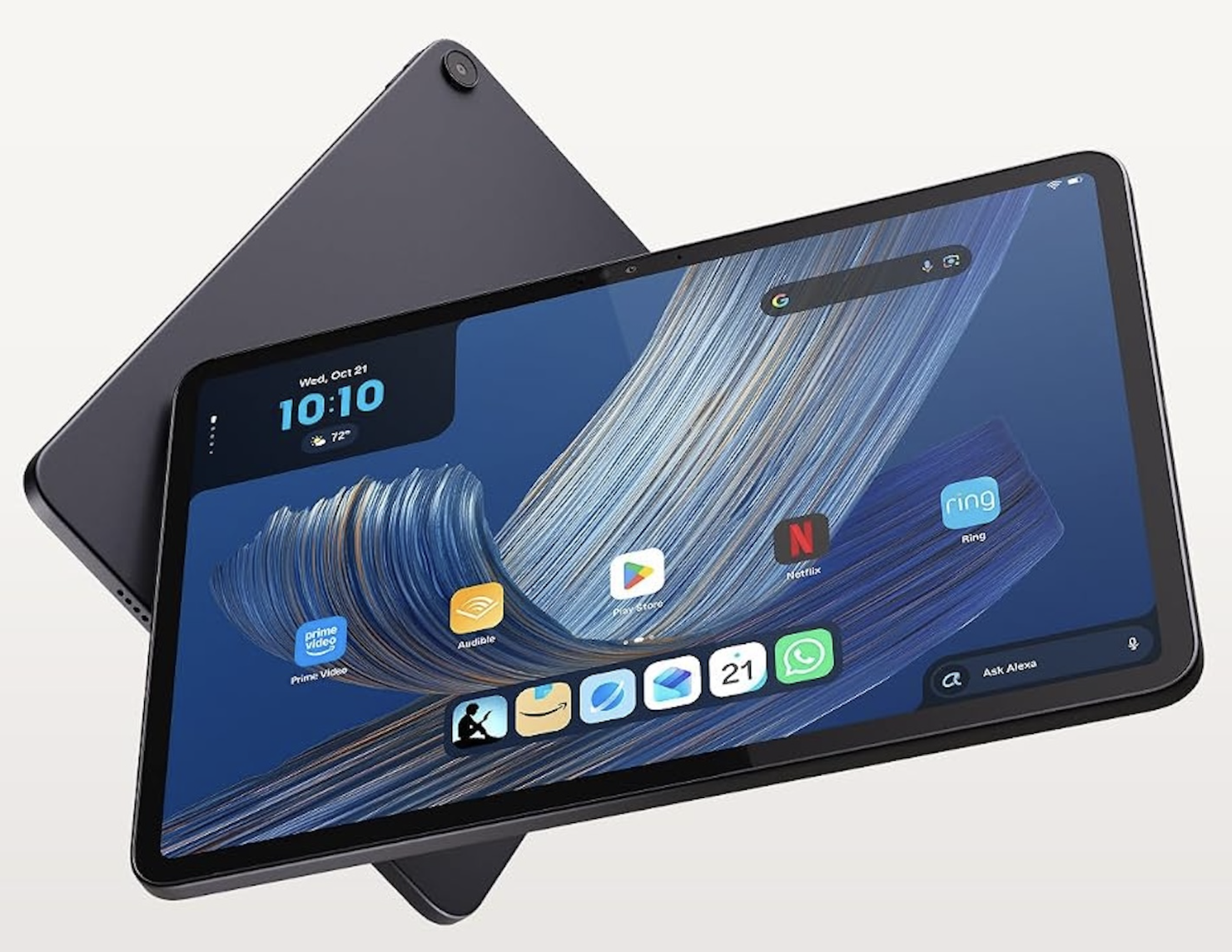
Amazon has launched a new family of tablets and refreshed its Kindle e-readers, and the headline prices look friendlier than they first appear. Several models ship with lockscreen ads unless you pay extra, which changes the real cost of owning them.
In this article, we will discuss the three Alexa Tablets, their prices and key specs, how Alexa+ fits into the software, what the ad-free surcharge means, the updated Kindle range, the smart home extras, and how to choose sensibly.
The New Lineup at a Glance
Amazon announced three Alexa Tablets that run Android with a custom layer on top, so they behave like familiar tablets rather than closed devices. According to Engadget, they include the Google Play Store, which means you can install the same apps you would find on any other Android tablet, and they have Alexa+ built in. Engadget also notes that none of them has a microSD slot, so the storage you choose at checkout is the storage you keep.
The timing is staggered by region. Engadget reports that the Alexa Tablets went on sale on 14 October 2026 in the US, Mexico and Canada, and go on sale on 19 October in the UK, Germany, France, Italy and Spain. For American readers, that means they are on the shelf now, so the usual questions about deals, trade-offs and return windows apply.
The Kindle announcements were less specific about timing. Engadget gave prices for the new e-readers but no release dates, so readers who want one will need to watch Amazon’s official product pages for availability. We will treat the Kindle details as announced pricing rather than something you can order today.
Three tiers of tablet and a ladder of e-readers make for a confusing shopping list, so the sections below go through each in turn. The most important thing to notice early is that the sticker price is only the start of the story, because some of the cheaper models carry lockscreen ads by default.
Where the Tablets Sit in the Market
Tablet buyers tend to fall into three camps: people who want a low-cost screen for video and reading, people who want a capable all-rounder, and people who want something close to a laptop replacement. Amazon has built one model for each. The Alexa Tablet 8 is the budget screen, the Alexa Tablet 11 is the all-rounder, and the Alexa Tablet 12 Pro goes after the productivity crowd with a keyboard and a pen on offer as extras.
That tiering is useful because it makes the decision about priorities rather than about a long spec sheet. Decide first how you will use the device, then look at the price of the tier that matches.
Prices and Specs of the Three Tablets
According to Droid Life, the Alexa Tablet 8 costs $229.99, the Alexa Tablet 11 costs $329.99, and the Alexa Tablet 12 Pro costs $499.99, or $549.99 with a Nanomatte anti-glare display. Engadget lists the Tablet 8 as “from $230,” which is the same price rounded, so $229.99 is the figure to use. The table below collects the reported specs in one place, and a cell marked not stated means the reporting we have did not give that detail.
| Model | Price | Display | RAM | Storage | Speakers | Reported video battery |
| Alexa Tablet 8 | $229.99 | 8.7-inch | 4GB | 64 or 128GB | Not stated | Up to 14 hours |
| Alexa Tablet 11 | $329.99 | 11-inch, 2.5K, 90Hz | 8GB | Not stated | Dual Dolby Atmos | Up to 15 hours |
| Alexa Tablet 12 Pro | $499.99 ($549.99 with Nanomatte anti-glare display) | 12-inch, 2,880 by 1,920, 120Hz, 3:2 | 8GB | 128 or 256GB | Quad Dolby Atmos | Up to 16 hours (20 hours in Kindle mode) |
The 12 Pro is also the only model for which the reporting names a processor: the MediaTek Dimensity 8400. Droid Life did not name chips for the other two in the material we have, so any comparison of raw speed between the tiers would be guesswork.
The Alexa Tablet 8
The smallest model has an 8.7-inch display, 4GB of memory and a choice of 64 or 128GB of storage, with up to 14 hours of video playback. That is a pocketable size for reading, streaming and kitchen-counter use, and the price is the lowest of the three. Four gigabytes of memory is modest, so expect it to be happiest with video, reading, browsing and light games rather than heavy multitasking.
The missing microSD slot matters most here. If you plan to load a lot of downloaded video for trips, the 128GB option is safer than the 64GB one, because you cannot expand later.
The Alexa Tablet 11
The middle model steps up to an 11-inch 2.5K display at 90Hz, with 8GB of memory and dual Dolby Atmos speakers. A 90Hz panel updates the screen more often than a standard 60Hz one, which makes scrolling and animations look smoother. Battery life is reported at up to 15 hours of video.
Storage options were not given in the reporting we have, so check the configuration when you shop. The doubled memory is the quiet advantage of this tier. If you keep many apps open or use the tablet for schoolwork, that extra headroom is likely to matter more than the screen refresh rate.
The Alexa Tablet 12 Pro
The top model has a 12-inch display of 2,880 by 1,920 pixels at 120Hz in a 3:2 shape, which is taller than the 16:9 screens common on video-focused tablets and better suited to documents and reading. It uses the MediaTek Dimensity 8400 chip, has 8GB of memory, 128 or 256GB of storage and quad Dolby Atmos speakers. The reported battery life is up to 16 hours of video, or up to 20 hours in Kindle mode.
Droid Life lists two accessories: the Pro Keyboard at $149.99 and the Pro Pen at $89.99. Added together, those come to $239.98, so a 12 Pro with both accessories and no anti-glare upgrade lands at $739.97 before tax. That is an illustration built only from the listed prices, but it shows how quickly the total climbs once you build the full productivity setup.
Kids Editions
Engadget reports that kids editions of the Tablet 8 and Tablet 11 come with a kid-proof case and one year of Amazon Kids+. The reporting we have does not give separate prices for those editions, so check the product pages before assuming they cost the same as the standard models. What the bundle gives you is a case that can survive drops and a year of curated content, after which the subscription presumably needs a decision. Confirm the renewal terms at purchase.
Reading the Specs With a Skeptical Eye
Spec tables flatter every product, so a few cautions help. Battery hours are for video playback under test conditions, and real use with the screen bright, a game running or the speakers loud will drain faster. Refresh rates of 90Hz and 120Hz make motion smoother but cost battery, so a high number is not automatically a reason to pay more. And memory of 4GB versus 8GB is the difference you will feel after a year of updates, when apps grow and the system leans on spare capacity.
The honest summary is that the Tablet 8 is built for simple jobs, the Tablet 11 for a mix of jobs, and the 12 Pro for people who will push the hardware. Match the tier to your habits and the specs mostly sort themselves out.
Kindle Mode on the 12 Pro
The 12 Pro’s reported 20 hours in Kindle mode, against 16 for video, hints at a reading-focused display mode. Droid Life’s figures do not describe how that mode looks or behaves, so wait for reviews before treating the tablet as a replacement for a dedicated e-reader. An LCD-style tablet screen is a different thing to read on than e-ink, and eye comfort over long sessions is a personal matter. If reading is your main use, a Kindle from the list below remains the cheaper and lighter choice.
Android, the Play Store and Alexa+ on Screen
The software story is the most interesting part of the launch. The tablets run Android with a custom layer, include the Google Play Store, and have Alexa+ built in, according to Engadget. Access to the Play Store matters because missing apps is a classic reason people hesitate over a tablet from a retailer rather than a traditional device maker.
A custom layer means Amazon controls the look of the home screen and some of the core features, and it can change how updates arrive. Readers who like a plain Android experience should check hands-on reviews to see how heavy the layer feels before buying.
What Alexa+ Adds
Droid Life describes several Alexa+ features. There are personalized home screens, hands-free live sessions, and a feature called On-Screen Intelligence, which offers real-time, context-aware help based on what is on the screen. The author compares it to Circle to Search. In practice, the idea is that you can ask the assistant about whatever you are looking at, such as a recipe, a product page or a street address, without copying text into a separate window.
You can activate Alexa by saying its name or by tapping an Ask Alexa button. Voice activation is convenient in a kitchen, and the button is a better choice in an open-plan office or on a train, where speaking to a tablet draws looks.
The Subscription Question
One important detail is missing from the reporting: it is not stated whether Alexa+ needs a subscription on these tablets. Until that is clear, treat the assistant as potentially a recurring cost and read the terms on the product page. If Alexa+ is included at no extra charge, the tablets are an easier sell. If it is not, the monthly arithmetic changes the value comparison with rival tablets.
This is a case where waiting for hands-on reviews and official fine print is worth the patience. Features that look decisive in an announcement are sometimes limited, regional, or tied to a service plan once the device reaches customers.
Software Updates and Long-Term Use
A tablet is a multi-year purchase, and the reporting does not say how long Amazon plans to supply software updates for these models. That is worth checking before you buy, since an Android device without regular security updates becomes harder to trust with banking apps and saved passwords. A custom layer can also delay the arrival of new Android versions. If you plan to keep the tablet for four or five years, that detail deserves a place in your decision alongside price and screen quality.
Lockscreen Ads and the Catch
Here is the part that affects the price you really pay. Droid Life reports that the Tablet 8 and Tablet 11 show lockscreen ads by default, and that removing them costs an additional $20. The reporting does not say whether that $20 is a one-time payment or something recurring, so the true long-term cost is unknown. Check how it is described at checkout.
The model is not new to Amazon customers. Lower-priced Kindles have long offered a choice between a cheaper version with sponsored screens and a version without. What is notable here is that the approach extends to the tablet line, and the reporting presents it as the default state on the two lower-cost models.
What the Surcharge Does to the Price
Using only the reported figures, removing ads from the Tablet 8 takes it from $229.99 to $249.99, and the same step takes the Tablet 11 from $329.99 to $349.99. Those totals are our arithmetic, not prices quoted in the reporting, and they assume the $20 is a single charge. If it turns out to recur, the comparison with other tablets would look different.
The figures matter because the ad-free versions are the comparable ones. If you dislike the idea of a promotional screen appearing each time you wake the tablet, the sticker price is not the number to compare against rivals.
Who Should Accept the Ads
Ads are a trade-off, not a trap. Someone who mostly uses a tablet in the evening for streaming may barely notice a lockscreen message on the way to the home screen, and the saving is real. A shared family tablet, a spare device for guests, or a tablet kept in a drawer between trips are good candidates for the cheaper version.
People who unlock a device dozens of times a day, or who care about a clean look, will probably find the surcharge worth paying. Think about how often you will see the screen, not the price tag alone. A useful test is to imagine your own week: count the times you pick the tablet up on a normal day, multiply by seven, and ask whether seeing a promotional message that many times is worth $20 to avoid. Most people can answer that quickly once they picture it. Parents should look carefully at what the kids editions do, since the reporting does not say whether those include or exclude ads.
What We Do Not Know
Several details remain unconfirmed in the sources: whether the $20 is recurring, whether the 12 Pro shows ads at all, and what kind of content the ads carry. The reporting says ads appear on the Tablet 8 and Tablet 11 by default and does not say the same of the 12 Pro. Do not assume either way, and read the listing before buying.
A Note on Returns and Trial Periods
Whatever you decide on ads, use the first weeks to test the device honestly. Wake it fifty times and see how the lockscreen feels. Watch a long video with the brightness at your normal level and check the battery drop. Try the voice features in a noisy room. If anything bothers you, a return is far easier in the first days than after the window closes, and the policy on the product page is the thing to read before ordering, since terms vary by seller and region.
Kindles With New Prices
The e-reader lineup got a refresh too, according to Engadget, which gave prices but no release dates. The range now stretches from a basic reader to a color model, and several versions follow the same ad or no-ad pattern as the tablets.
| Model | Price | Reported details |
| Kindle | From $150 with lockscreen ads, or $20 more without | 6-inch display, six-week battery |
| Kindle (aluminum) | $190 | 32GB |
| Kindle Paperwhite | $200 with ads, $220 without | 7-inch display, 16GB |
| Kindle Paperwhite Signature Edition | $250 | 32GB, aluminum back, auto-adjusting light |
| Kindle Colorsoft | $290 | 7-inch color display, up to eight weeks of battery |
| Kindle Colorsoft Signature Edition | $320 | 32GB |
Reading the Ladder
The pattern is consistent. A plain 6-inch reader costs $150 with ads, which is the cheapest entry point, and the ad-free version is $20 more. The Paperwhite moves to a 7-inch screen and 16GB for $200 with ads or $220 without. Signature Editions add 32GB, an aluminum back and an auto-adjusting light on the Paperwhite version, which is useful if you read in changing conditions, from bright trains to dark bedrooms.
The color models are the new twist. The Colorsoft is a 7-inch color reader rated at up to eight weeks of battery life, and it costs $290, with the Signature Edition at $320. Color e-ink suits comics, magazines, covers and highlighted notes, while text-only readers will find the standard Paperwhite plenty. Battery claims like eight weeks depend on how much you read and whether wireless features are on, so treat them as best-case figures.
Which Kindle Suits Which Reader
If you read novels in bed or on commutes, the Paperwhite at either price is a sensible center point, and the ad-free option is worth a thought for anyone who looks at the screen daily. If you read a lot of graphic or illustrated material, the Colorsoft is the model that justifies its higher price. If you only want something cheap and light, the base Kindle does the job, bearing in mind that it is the 6-inch model.
Because no release dates were reported, avoid committing to a purchase plan that depends on a specific day. Wait for the official pages to confirm availability.
Smart Home Additions From Ring
Engadget’s report also covered the Ring line, though this is a side note to the tablet and Kindle story. The Ring Smart Lock is priced at $249 and is due in early 2027. It has a fingerprint reader, a keypad, a hand crank for power if the battery dies, and Alexa lock and unlock support. The hand crank is a practical touch, because a smart lock that strands you outside when its batteries die is a poor trade.
Several 4K cameras have been updated for Retinal 4K capture, and a new Pan-Tilt Indoor Cam 2K rotates 360 degrees and tilts 175 degrees to follow motion. No prices or dates were given for those cameras. Engadget also notes that a Fire TV Stick 4K at $60 was announced in September, which is a separate item from this month’s launch.
These devices matter to the tablets because the tablets are meant to act as control panels for a home. If you plan to use an Alexa Tablet as a kitchen display for cameras and locks, check each product’s compatibility on its official page, as the reporting does not describe how tightly they work together.
Final Thoughts: How to Pick Without Regret
Start with how you will use the device. If you want a screen for reading and video, the Alexa Tablet 8 at $229.99 is the simplest answer, with the ad-free version at $249.99 if the surcharge is a one-time $20. If you want a smoother, larger display and more memory, the Alexa Tablet 11 at $329.99 is the stronger all-rounder. If you want to work on it, the 12 Pro makes sense, but only if you are willing to budget for the keyboard and pen.
Next, decide on ads. Ask yourself how often the lockscreen will be in front of you and whether the $20 feels like a fair price for a clean wake-up screen. Remember that the reporting does not say if that charge repeats, so read the checkout page carefully.
Third, check the storage. With no microSD slot on any of the tablets, the capacity you choose is permanent. For the Tablet 8 that means choosing between 64 and 128GB, and for the 12 Pro between 128 and 256GB. If you download video or large games, go higher. If you stream almost everything, the smaller option is enough.
Fourth, wait for independent reviews. Announcement coverage tells you what the maker says, not how the device performs in daily use. Brightness, speaker quality, screen glare, software smoothness and the feel of the custom Android layer are all questions that hands-on testing answers.
Fifth, look at return policies before you order and test the device early. A tablet that looks good on paper can feel sluggish, and a return window is your protection. Finally, if you are buying for a child, compare the kids edition against the standard model plus a third-party case, and note when the included year of Amazon Kids+ ends.
For e-readers, choose by screen size and light, not by chasing the largest number. Pick the Paperwhite if you are undecided, the Colorsoft if you read color-heavy material, and the base model if cost is your top concern. Prices and availability can change after launch, so the official Amazon pages are the place to confirm them. This is general information, not a recommendation tailored to your finances.
Curious about Apple’s reported 28 October event? Get the latest on a possible touchscreen MacBook Pro, M6 Macs, and a new iPad mini: https://techgili.com/apples-reported-28-october-mac-event-touchscreen-macbook-pro-m6-macs-and-ipad-mini/
Frequently Asked Questions
When Can I Buy the New Alexa Tablets?
According to Engadget, they went on sale on 14 October 2026 in the US, Mexico and Canada. In the UK, Germany, France, Italy and Spain, sales start on 19 October.
How Much Do the Alexa Tablet 8, 11 and 12 Pro Cost?
Droid Life lists the Alexa Tablet 8 at $229.99, the Alexa Tablet 11 at $329.99 and the Alexa Tablet 12 Pro at $499.99, or $549.99 with a Nanomatte anti-glare display. The Pro Keyboard is $149.99 and the Pro Pen is $89.99.
Do the New Alexa Tablets Have Lockscreen Ads?
The Tablet 8 and Tablet 11 show lockscreen ads by default, and removing them costs an additional $20, per Droid Life. The reporting does not say whether that fee is one-time or recurring.
Can I Install Apps and Add Storage on the New Tablets?
Yes to apps, since Engadget says they include the Google Play Store and run Android with a custom layer. No to storage expansion, because there is no microSD slot.
Does Alexa+ Cost Extra on These Tablets?
The reporting does not say whether Alexa+ needs a subscription on these tablets. Check the product page and checkout terms before you buy.
How Much Is the New Kindle With and Without Ads?
Engadget lists the base Kindle from $150 with lockscreen ads, or $20 more without. The Kindle Paperwhite is $200 with ads and $220 without, and no release dates were given.