

Canva has evolved from a simple drag-and-drop design platform into a powerful AI-driven creative workspace. While most users know Canva for creating social media graphics, presentations, and marketing materials, many people are unaware of the advanced artificial intelligence tools hidden inside the platform. These features can save hours of work, improve creativity, and help users create professional-quality content without needing advanced design skills.
I’ve noticed that Canva has grown beyond a simple design tool into a powerful AI-based platform that makes creating content faster and easier. Many users only use basic features, but I’ve noticed its hidden AI tools can completely transform the design process. They save time, boost creativity, and allow anyone to produce professional-level designs without needing advanced skills.
The rapid growth of AI technology has transformed the way people design, write, edit images, and produce content. Canva has embraced this shift by introducing a collection of intelligent tools that automate repetitive tasks and help users achieve better results faster. Yet many of these capabilities remain overlooked because users often stick to the basic design features they already know.
Whether you are a blogger, marketer, business owner, student, or content creator, understanding Canva’s lesser-known AI features can significantly improve your workflow. From generating images with text prompts to automatically creating presentations and editing photos with a single click, Canva offers tools that feel almost magical when used correctly.
This article explores the hidden Canva AI features that most people have no idea exist and explains how they can help you work smarter rather than harder.
Why Canva Is Investing Heavily in AI
Artificial intelligence is revolutionizing how digital content is created, and things are moving faster than ever. Canva understands that users want quick and easy ways to make professional-looking designs without having to spend hours mastering complex tools. By embedding AI right into its platform, Canva makes the whole design process simpler and more accessible, breaking down many of the usual obstacles that come with graphic design.
Instead of manually editing every element, users can now rely on AI to generate content, suggest layouts, remove backgrounds, improve images, and even write marketing copy. This approach allows beginners to create high-quality work while helping professionals speed up production.
The aim isn’t to take away from creativity, but rather to boost it. AI serves as a helpful assistant by taking care of repetitive tasks, allowing creators to dedicate more time to developing ideas, storytelling, and strategic planning.
To explore Canva’s latest AI innovations and feature updates, readers can visit the official Canva AI page at Canva AI.
Magic Design: The Feature That Builds Designs for You
How Magic Design Works
Magic Design is one of Canva’s most impressive AI features. Users can upload an image or describe a concept, and Canva automatically generates multiple design templates based on that input. Instead of starting with a blank canvas, you instantly receive professionally designed options tailored to your needs.
For example, if you upload a product photo, Canva can create social media posts, advertisements, presentations, and promotional graphics using that image. This dramatically reduces design time and helps users overcome creative blocks.
Why Most Users Overlook It
Many Canva users continue searching manually through thousands of templates because they are unaware that Magic Design can generate custom layouts in seconds. This hidden capability can be especially valuable for marketers managing multiple campaigns and businesses needing consistent branding.
Magic Write: Canva’s Built-In AI Writing Assistant
Creating Content Faster
Most people associate Canva with graphic design rather than writing. However, Magic Write can generate blog ideas, social media captions, email drafts, product descriptions, and marketing content directly inside Canva.
Instead of switching between multiple applications, users can brainstorm and write content within the same platform where they create visuals. This streamlined workflow saves time and improves productivity.
Best Use Cases
Magic Write works particularly well for:
- Social media captions
- Video scripts
- Marketing copy
- Product descriptions
- Presentation content
- Blog outlines
While human editing remains important, the tool provides an excellent starting point for content creation.
Text-to-Image Generation
Turning Ideas into Visuals
One of Canva’s most exciting AI capabilities is its text-to-image generator. Users simply type a description, and Canva creates original images based on that prompt. This feature is especially useful when stock photos fail to match a specific vision.
A marketer can describe a futuristic office, a travel blogger can generate unique destination-inspired artwork, and educators can create custom illustrations for presentations.
For a deeper understanding of how AI image generators create visuals from text prompts, readers can explore IBM’s explanation of generative AI.
Creative Advantages
The text-to-image tool allows creators to:
- Produce unique visuals
- Reduce dependence on stock photography
- Experiment with different artistic styles
- Create content faster
For users who frequently need custom graphics, this feature can become a major competitive advantage.
Magic Edit: Advanced Image Modification
Editing Without Complex Software
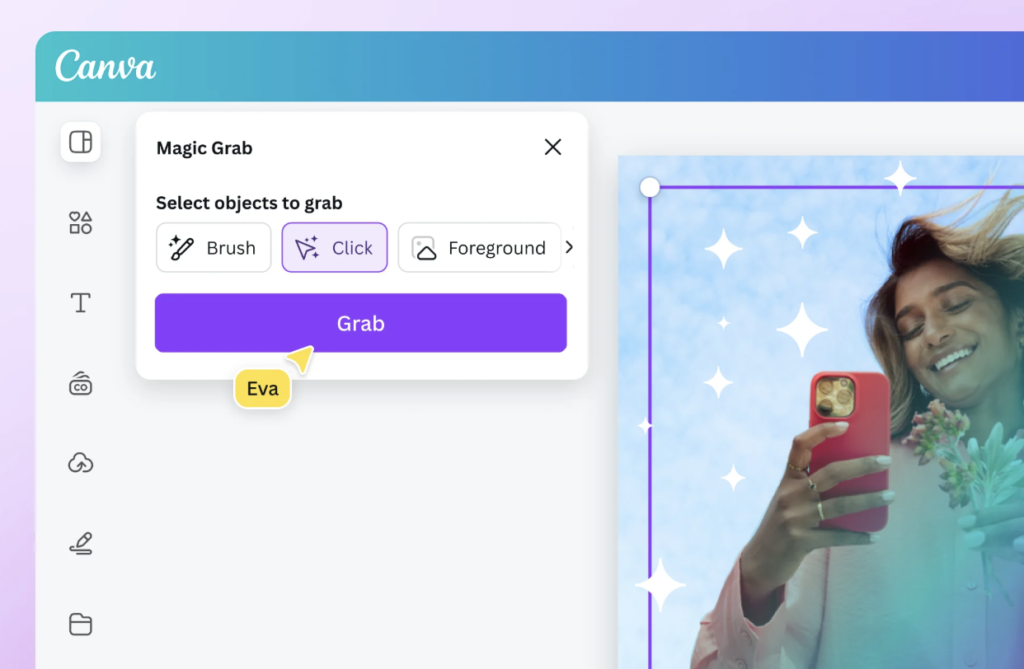
Traditional photo editing often requires specialized knowledge. Magic Edit makes editing easier by letting users pick specific areas of an image and then describe what changes they want to see.
For example, a user can replace a cloudy sky with a sunset, change clothing colors, or add design elements without using advanced editing software.
Real-World Applications
Businesses can quickly update product photos, marketers can customize campaign visuals, and content creators can make adjustments that previously required professional editing skills.
Magic Eraser: Remove Unwanted Objects Instantly
A Powerful Cleanup Tool
Every designer eventually encounters a photo ruined by unwanted objects or distractions. Magic Eraser solves this problem with remarkable simplicity. Users highlight the unwanted element, and Canva removes it automatically.
Whether it’s a person in the background, a distracting sign, or an unwanted object, the tool can often deliver impressively clean and refined results.
Why It Saves Time
Instead of spending hours manually retouching images, users can clean up photos in seconds. This feature is especially helpful for social media managers, online retailers, and photographers who want quick and efficient editing tools.
Magic Expand: Extending Images Beyond Their Borders
Expanding Photos for Different Formats
One challenge content creators face is adapting images for different platforms. A photo designed for Instagram may not fit a presentation slide or website banner.
Magic Expand intelligently extends the image beyond its original dimensions by generating additional visual content that matches the existing scene.
Practical Benefits
This feature helps creators reuse images across multiple formats without awkward cropping or stretching. It also allows designers to create more flexible layouts while maintaining visual quality.
AI-Powered Background Removal
More Than a Simple Cutout Tool
Canva’s background remover is well known, but many users underestimate its power. The AI can accurately separate subjects from backgrounds with impressive precision.
Businesses selling products online can quickly create professional product images, while marketers can isolate subjects for advertisements and promotional materials.
Improving Professional Appearance
Clean backgrounds often make designs look more polished and trustworthy. The ability to achieve this in seconds gives users access to results that once required expensive software.
Beat Sync for Video Content
Automated Video Timing
Video editing can be time-consuming, especially when matching clips to music. Canva’s Beat Sync feature automatically aligns video transitions with the rhythm of a selected soundtrack.
This results in more seamless and captivating videos, even without extensive editing skills.
Why Content Creators Love It
Short-form video platforms reward engaging content. Beat Sync helps creators produce professional-looking videos faster, increasing audience retention and overall content quality.
Magic Animate
Bringing Static Designs to Life
Animation can dramatically improve engagement, but creating animations manually often requires specialized expertise. Magic Animate automatically generates animation styles for presentations, social posts, and marketing materials.
Users can apply dynamic motion effects with just a few clicks.
Enhanced Viewer Engagement
Animated content attracts attention more effectively than static visuals. This makes Magic Animate valuable for presentations, advertisements, and social media campaigns.
Translate Designs Instantly
Reaching Global Audiences
Canva includes an AI-powered translation feature that can convert design text into multiple languages while maintaining formatting and layout.
This capability helps businesses expand into international markets without redesigning materials from scratch.
Efficiency for Businesses
Organizations serving multilingual audiences can produce localized content much faster, improving communication and audience reach.
AI Presentation Creation

Building Slides from Simple Prompts
Creating presentations often involves significant planning and design work. Canva’s AI presentation generator can build entire slide decks from a brief prompt.
Users receive a structured presentation complete with suggested content, layouts, and visuals.
Perfect for Busy Professionals
Students, educators, consultants, and business leaders can rapidly develop presentations while focusing their energy on refining key messages rather than building slides manually.
How These Hidden AI Features Improve Productivity
The true value of Canva’s AI tools lies in the cumulative time savings they provide. Instead of performing repetitive tasks manually, users can automate large portions of the creative process. This increased efficiency allows individuals and teams to produce more content without sacrificing quality.
Small businesses benefit because they can create professional marketing materials without hiring large design teams. Content creators gain the ability to publish consistently, while educators can prepare engaging teaching materials faster.
AI tools also reduce the intimidation factor often associated with design software. Beginners can achieve professional-looking results with minimal experience, making creativity more accessible to everyone.
Conclusion
Canva has quietly transformed itself into one of the most accessible AI-powered creative platforms available today. While many users continue relying on its basic templates and design tools, the platform contains a wide range of advanced AI capabilities that can dramatically improve workflow efficiency.
Features such as Magic Design, Magic Write, Text-to-Image, Magic Edit, Magic Eraser, Magic Expand, Beat Sync, and AI presentation generation demonstrate how artificial intelligence is reshaping content creation. These tools help users save time, enhance creativity, and produce professional-quality work without extensive technical knowledge.
As AI continues to evolve, Canva is likely to introduce even more powerful capabilities. Users who take the time to explore these hidden features today will be better positioned to create faster, smarter, and more effectively in the future.
FAQs
What is the most underrated Canva AI feature?
Magic Design is arguably the most underrated Canva AI feature because it can automatically generate complete design concepts from a simple image or idea, saving significant design time.
Can Canva AI create original images?
Yes. Canva’s Text-to-Image tool can generate original visuals based on written prompts, making it useful for content creators who need unique graphics.
Is Canva AI useful for writers?
Absolutely. Magic Write helps generate content ideas, social media captions, blog outlines, marketing copy, and other forms of written content.
Do Canva AI features work for businesses?
Yes. Businesses can use Canva AI for branding, content marketing, product photography, presentations, social media campaigns, and multilingual communication.
Are Canva AI tools beginner-friendly?
Most Canva AI features are designed specifically for ease of use. Even users with little or no design experience can create professional-looking content quickly.