

Today, the internet is an essential part of our daily routines. From streaming movies and attending virtual meetings to online shopping and managing finances, almost everything relies on a stable internet connection. However, this convenience comes with risks. Cybercriminals continuously look for vulnerable devices and networks to exploit.
This is where a firewall becomes essential. Many people ask, what is a firewall and does your home network actually need one? The answer is increasingly important as homes become filled with connected devices.
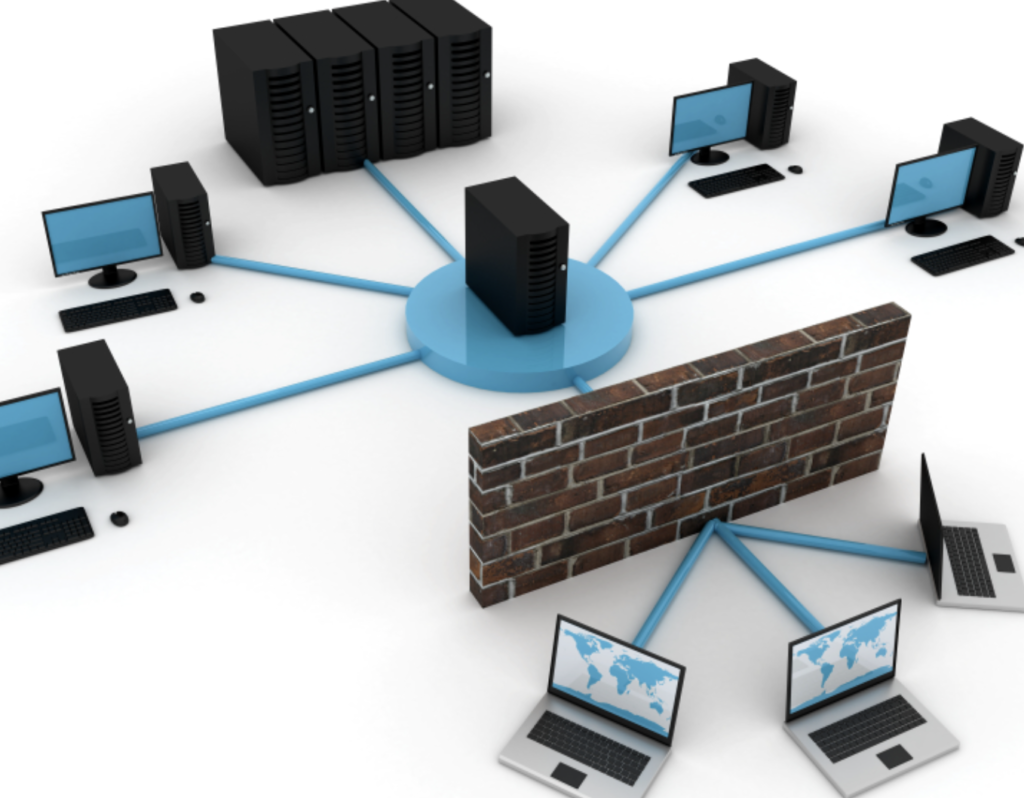
A firewall acts as a digital security guard between your home network and the internet. It monitors traffic, blocks suspicious activity, and helps prevent unauthorized access to your devices. Whether you have a single laptop or a house full of smart gadgets, understanding firewalls can significantly improve your online safety.
With cyber threats constantly advancing, just using passwords isn’t sufficient for protection. A firewall provides an additional layer of protection that can help keep your personal information secure.
Understanding How a Firewall Works
A firewall is a security system that controls network traffic based on predefined rules. It evaluates data entering and leaving your network and decides whether to allow or block it.
Monitoring Incoming Traffic
Incoming traffic refers to data coming from the internet into your network. Firewalls inspect this traffic and block potentially harmful connections before they reach your devices.
For example, if a hacker attempts to gain access to your computer, the firewall can detect unusual behavior and stop the connection attempt.
Monitoring Outgoing Traffic
Firewalls also monitor data leaving your network. This helps detect malware that may try to communicate with external servers without your knowledge.
By analyzing outgoing connections, a firewall can prevent sensitive information from being transmitted to cybercriminals.
Packet Filtering Explained
Data traveling across networks is broken into small units called packets. A firewall examines these packets and compares them against security rules.
If a packet appears legitimate, it passes through. If it looks suspicious, it gets blocked immediately.
This filtering process happens in real time and usually goes unnoticed by users.
Different Types of Firewalls
Not all firewalls function the same way. Understanding the different options helps you choose the best protection for your home network.
Hardware Firewalls
Hardware firewalls are physical devices placed between your internet connection and your home network.
Many modern routers include built-in firewall functionality. These devices provide network-wide protection and require minimal user intervention.
Advantages include:
- Protection for all connected devices
- Continuous monitoring
- Low impact on device performance
- Easy centralized management
Software Firewalls
Software firewalls are installed directly on computers, smartphones, or tablets.
They monitor traffic specific to the device on which they are installed.
Benefits include:
- Customized security settings
- Application-level monitoring
- Detailed alerts and notifications
- Individual device protection
Cloud-Based Firewalls
Cloud firewalls operate through remote servers rather than local hardware.
These solutions are often used by businesses but are becoming more accessible for home users who want advanced security capabilities.
Why Home Networks Are Attractive Targets
Many people assume hackers only target large corporations. In reality, home networks are increasingly popular targets because they often have weaker security measures.
Growth of Smart Devices
Modern homes may contain dozens of connected devices, including:
- Smart TVs
- Security cameras
- Voice assistants
- Smart thermostats
- Gaming consoles
- Smart appliances
Every connected device creates another potential entry point for attackers.
Remote Work Risks
Remote work has become common across many industries. Employees frequently access company systems from home networks.
Cybercriminals recognize this opportunity and often target remote workers to gain access to valuable business information.
Online Banking and Shopping
Financial transactions occur daily on home networks. Attackers know that compromising a home network can potentially expose:
- Credit card information
- Banking credentials
- Personal documents
- Login details
- Identity information
This makes strong network protection more important than ever.
7 Powerful Reasons Your Home Network Needs a Firewall
When discussing what is a firewall and does your home network actually need one, the benefits become very clear.
Protection Against Hackers
Hackers continuously scan the internet looking for vulnerable systems. A firewall blocks unauthorized access attempts and reduces the likelihood of successful attacks.
Without a firewall, devices may be exposed directly to malicious actors.
Blocking Malware
Malicious software, or malware, encompasses viruses, ransomware, spyware, and various other dangerous programs.
Firewalls help identify suspicious traffic patterns associated with malware and prevent many attacks before they reach your devices.
Privacy Protection
Personal information is valuable. Cybercriminals can exploit stolen data for identity theft, fraud, and financial crimes.
A firewall helps safeguard sensitive information by controlling network communications.
Device Security
Homes often contain multiple devices connected to the same network.
A firewall creates an additional security barrier that protects laptops, smartphones, tablets, and smart devices from external threats.
Network Monitoring
Modern firewalls provide visibility into network activity.
Users can often view:
- Connected devices
- Data usage
- Security events
- Connection attempts
- Blocked threats
This visibility helps identify unusual activity quickly.
Safe Remote Access
Many people access home devices remotely while traveling.
A firewall can secure remote connections and reduce exposure to unauthorized users.
Better Control of Internet Usage
Some firewall solutions include parental controls and content filtering features.
These tools allow families to:
- Restrict inappropriate content
- Limit internet access during specific times
- Monitor online activities
- Manage device permissions
Firewall vs Antivirus
A common misconception is that antivirus software eliminates the need for a firewall.
In reality, these tools serve different purposes.
Key Differences
| Firewall | Antivirus |
| Monitors network traffic | Scans files and applications |
| Blocks unauthorized access | Detects and removes malware |
| Protects network connections | Protects device storage |
| Prevents many attacks before entry | Removes threats after detection |
Why You Need Both
Using both a firewall and antivirus software creates layered protection.
The firewall acts as the first line of defense by stopping suspicious traffic, while antivirus software identifies and removes threats that may bypass other security measures.
Security experts generally recommend combining both solutions for maximum protection.
For additional cybersecurity guidance, visit the official resource center provided by Cybersecurity and Infrastructure Security Agency (CISA).
Signs Your Home Network Needs Better Security
Several warning signs indicate that your network security may be insufficient.
These include:
- Frequent pop-up advertisements
- Slow internet performance
- Unknown devices connected to your network
- Unexpected software installations
- Suspicious account activity
- Unusual data usage
- Random system crashes
If you notice any of these issues, reviewing your firewall settings should be a priority.
How to Choose the Right Firewall
Choosing the right firewall depends on your needs, budget, and technical expertise.
Features to Look For
Consider solutions that offer:
- Real-time monitoring
- Automatic updates
- Intrusion prevention
- Malware detection
- Device management
- Parental controls
- User-friendly dashboards
Advanced users may also want detailed reporting and customizable security policies.
Budget Considerations
Home firewall options range from free software solutions to advanced hardware devices.
General categories include:
| Firewall Type | Typical Cost | Suitable For |
| Built-in Router Firewall | Included | Most households |
| Free Software Firewall | Free | Individual users |
| Premium Software Firewall | Low monthly cost | Families |
| Dedicated Hardware Firewall | Higher investment | Advanced users |
Most households can achieve excellent protection using a modern router with firewall features combined with reputable security software.
Best Practices for Firewall Security
Setting up a firewall is just one piece of the overall security puzzle. Proper maintenance is equally important.
Follow these best practices:
- Keep firewall firmware updated.
- Change default router passwords.
- Use strong Wi-Fi encryption.
- Enable automatic security updates.
- Review firewall logs regularly.
- Remove unused devices from the network.
- Disable unnecessary remote access features.
- Use multi-factor authentication whenever possible.
- Update connected smart devices frequently.
- Educate family members about online security risks.
Consistent maintenance significantly improves the effectiveness of your firewall.
Conclusion
Understanding what is a firewall and does your home network actually need one is crucial in today’s connected world. Cyber threats continue to evolve, and home networks have become valuable targets for attackers seeking personal and financial information.
A firewall serves as a critical barrier between your devices and potential threats. It monitors network traffic, blocks suspicious activity, protects sensitive information, and strengthens overall cybersecurity. Whether you work remotely, manage smart home devices, or simply browse the internet, a firewall offers valuable protection.
The good news is that many modern routers already include firewall functionality, making it easier than ever to improve home network security. When combined with antivirus software, strong passwords, and regular updates, a firewall becomes an essential part of a comprehensive cybersecurity strategy.
Investing time in understanding and maintaining your firewall today can help prevent costly security incidents tomorrow.
Frequently Asked Questions
1. What is a firewall and does your home network actually need one?
A firewall serves as a protective barrier that oversees and manages the flow of data across networks. Yes, every home network benefits from a firewall because it helps block unauthorized access and cyber threats.
2. Is a firewall necessary if I already have antivirus software?
Yes. Antivirus software and firewalls perform different functions. Using both provides stronger protection against cyberattacks.
3. Are router firewalls enough for home users?
For many households, a router firewall provides a strong first layer of protection. However, combining it with device-level security improves overall safety.
4. Can a firewall stop hackers completely?
No security solution guarantees complete protection. However, a firewall significantly reduces risk by blocking many attack attempts before they reach your devices.
5. Do smartphones need firewall protection?
Smartphones benefit from network-level firewall protection provided by routers and may also use security applications for additional safeguards.
6. Will a firewall slow down my internet connection?
Modern firewalls generally have minimal impact on internet speed. Most users will not notice any performance difference.
7. How often should firewall settings be reviewed?
Reviewing settings every few months is a good practice. Additional reviews should occur whenever new devices are added to the network.
8. What devices benefit from a firewall?
Computers, smartphones, tablets, gaming consoles, smart TVs, cameras, and Internet of Things (IoT) devices all benefit from firewall protection.