

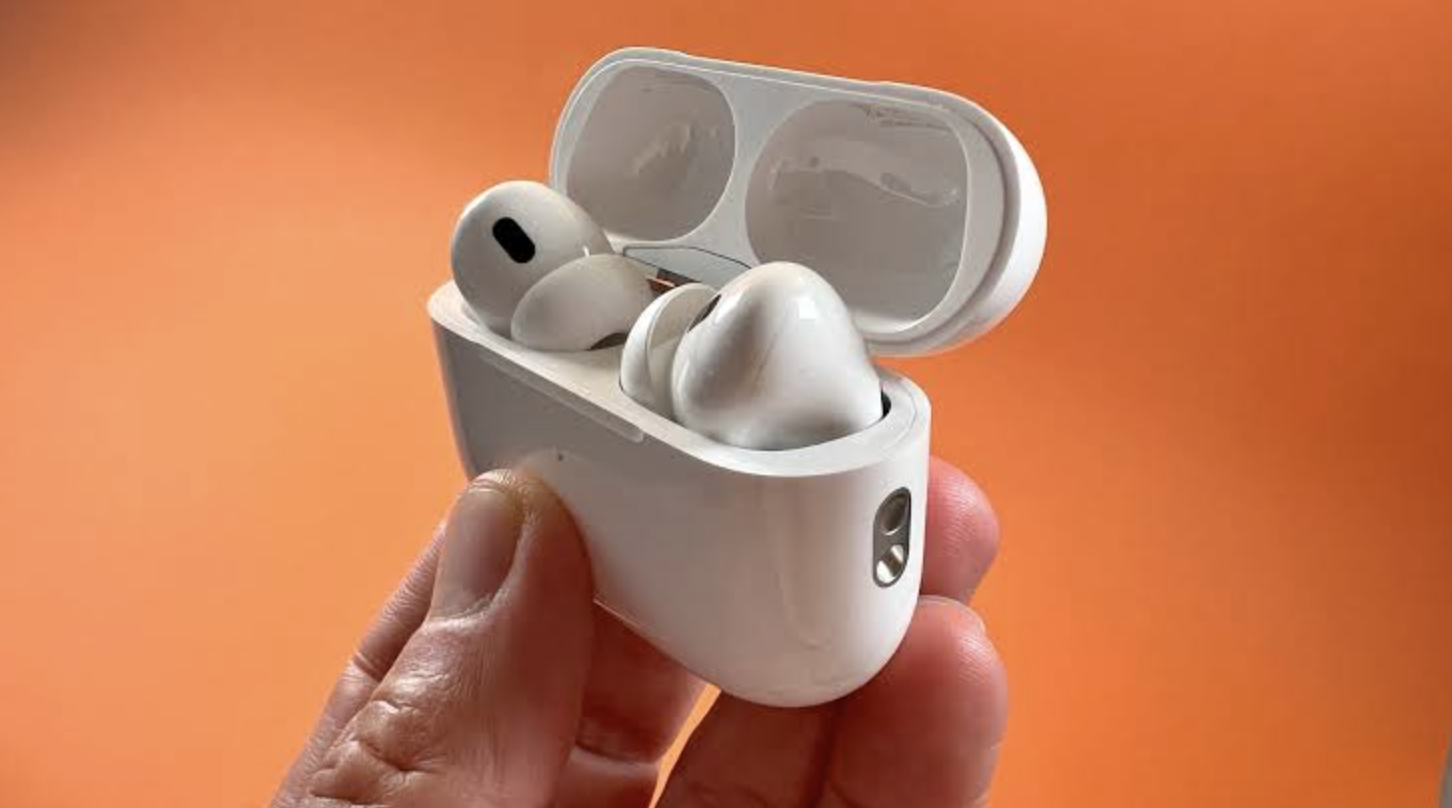
Wireless earbuds have become the everyday way to listen to music, take calls and follow podcasts, yet the labels on the box rarely tell you what you will experience. Codec names, battery claims and fit descriptions can sound like marketing noise, even though each one affects how the earbuds feel and sound in real life.
In this article we will discuss what codecs do, how to read battery figures, why fit matters so much, and how to test a pair before you commit.
Codecs explained in plain language
When you play music over Bluetooth, your phone cannot send the full original file through the air, so it compresses the audio and the earbuds unpack it again. The set of rules for doing that is called a codec. Every Bluetooth audio device supports a basic codec known as SBC, which guarantees that any phone can talk to any pair of earbuds. Other codecs exist to improve efficiency, lower delay or deliver more detail, but they only work when both devices support them.
The most common extras are easy to sort into families. AAC is widely used with Apple devices and many other phones, and it generally sounds good at moderate data rates. The aptX family, developed by Qualcomm, appears in many Android phones and earbuds, with variations aimed at higher quality or lower delay. LDAC, from Sony, can carry more data for a higher quality link on supporting devices. A newer approach called LE Audio uses a codec named LC3, which aims to deliver good sound at lower power, though support depends on your phone and your earbuds.
Here is the important part: your phone and your earbuds negotiate and settle on the best codec they both share. If your phone supports a high quality codec and your earbuds do not, you will fall back to a simpler one automatically. Some phones let you see or change the codec in developer settings, while others hide the choice completely. Check the specification pages for both devices before you buy if you care about a particular codec.
Be realistic about what a codec changes. In everyday listening on a bus or in an office, the difference between good codecs is small, and the room noise often covers it. The tuning of the drivers, the fit in your ear and the quality of the audio file or streaming setting usually have a bigger effect than the codec name on the box. A highly compressed streaming setting will limit quality no matter which codec carries it.
Streaming services add their own layer. Most music apps stream at a set quality level and let you choose a lower or higher setting, and some offer higher quality tiers that Bluetooth cannot fully carry anyway. If you want to hear the best your earbuds can offer, check the quality setting inside the app first, and then compare codecs only if you still hear a gap. Wired headphones remain the simplest way to avoid compression on the wireless link altogether.
| Codec family | Typical role | Notes |
| SBC | Universal baseline | Supported by nearly all Bluetooth audio devices |
| AAC | Common everyday codec | Strong match for Apple devices, also used elsewhere |
| aptX family | Android-focused options | Different versions target quality or low delay |
| LDAC | High data rate | Needs support on both phone and earbuds |
| LC3 with LE Audio | Efficient newer approach | Depends on device and software support |
Battery life numbers and what affects them
Battery claims are best read as a ceiling rather than a promise. Makers normally test at a moderate volume with features such as noise cancelling switched off, and they often quote a total that includes recharges from the case. Two numbers matter: how long the earbuds last on one charge, and how many additional charges the case provides. A pair that offers several hours per charge and a few extra charges in the case will easily cover a day of mixed use.
Several things shorten the figures. Turning on active noise cancelling, using transparency mode, raising the volume, using a high data rate codec and making long calls all draw more power. Cold weather also reduces how much a small battery can deliver, which is why earbuds can seem to die early on a winter run. If you rely on features such as spatial audio or voice assistants that listen all the time, expect a drop in listening time as well.
To measure your own battery life, charge the earbuds fully, start music at your usual volume with your usual features turned on, and note the time. Check the app after an hour and again after two to see how the percentage moves, and repeat the test with noise cancelling turned off. This simple experiment gives you numbers that apply to you, and it makes it easy to spot a pair that is falling short of its claim during the return period.
Think about how you use the case. A case that charges by cable, by a wireless pad, or both is more flexible, and a quick top-up feature that gives an hour of listening from a few minutes in the case is valuable if you often forget to charge. Many people keep the case in a bag or a coat pocket and drop the earbuds back in whenever they stop, which keeps them topped up without any thought. Treat the case as part of the system and consider its size, because a large case can be annoying in a small pocket.
Batteries age. Small lithium cells inside earbuds lose some capacity over the years, and since they are rarely replaceable, the pair gradually becomes less useful. You can slow this wear by avoiding extreme heat, not leaving them flat for months and not charging them in a hot car. If you plan to keep earbuds for several years, look at whether the maker offers a battery service or a clear replacement policy.
Fit, seal and comfort come before sound quality
Fit is the most underrated part of choosing earbuds. In-ear designs with silicone or foam tips form a seal in the ear canal, which keeps the bass in and the outside noise out. Open-style designs sit at the entrance of the ear and let ambient sound through, which can feel safer outdoors but offers less bass and less isolation. A poor seal can make an expensive pair sound thin, and it can make noise cancelling work badly.
Ear shapes vary a great deal, even between your own left and right ears. Most earbuds ship with several tip sizes, and it is common to need different sizes in each ear. Try them in this way: insert the earbud with a gentle twist, play a track with steady bass, and then pull the earbud slightly outward. If the bass drops when you pull, you have a seal, and if it sounds the same whatever you do, the tip is probably too small or the earbud is sitting in the wrong position.
Comfort over time is different from comfort in the first minute. Some designs press on the same spot in the ear after an hour, while others feel light all day. Look at the weight, the shape of the body and whether the stem or the housing touches the outer ear. If you wear glasses, hats or a headscarf, test the pair with those items on, because pressure from them can push the earbuds out of place or create sore spots.
Security of fit matters for movement. Runners and gym users often prefer ear hooks, wings or fins that lock the earbud into the ear. These add stability, but they also add bulk, and some people find them uncomfortable for long sessions. If you plan to exercise, move your head, jog on the spot and shake gently in the shop or at home within the return period to see whether the earbuds stay put.
Size and weight matter for people with smaller ears and for children, who may need earbuds designed for a smaller canal or a different style altogether. Children are often better served by headphones that limit the maximum volume, and parents can look for a volume limit setting on the phone. If an earbud keeps falling out or hurts, do not force it, since a poorly fitting pair is both annoying and unsafe at the volume it encourages.
Hygiene belongs here too. Wipe the tips and the nozzles with a soft cloth, follow the maker’s cleaning advice, and replace worn silicone tips when they stretch or tear. Foam tips usually wear out sooner than silicone, though many people find them more comfortable and better at sealing. If you feel pain, itching or discharge from the ear, stop using the earbuds and speak to a doctor.
Noise cancelling and transparency modes
Active noise cancelling uses microphones to pick up outside sound and creates an opposing signal that reduces it. It works best on steady, low-pitched noise such as engines, air conditioning and the hum of a train, and it is less effective on sudden sounds such as speech or a clattering plate. Because it relies on a good seal, your choice of tips has a direct effect on how well it works. Passive isolation from the fit itself does a lot of the work, especially at higher pitches.
Transparency mode, sometimes called ambient mode, does the opposite by letting outside sound through the microphones. It is useful when you need to hear announcements, talk to a cashier or stay aware of traffic. The quality varies, and some people find that transparency mode sounds slightly artificial or adds a faint hiss. Try it with a real conversation rather than only listening in a quiet room.
Noise cancelling can feel strange to some listeners, producing a sense of pressure in the ears. If it bothers you, look for a model that allows several levels of cancelling or lets you switch it off. Never use any mode that blocks traffic sounds when you are walking in busy streets, cycling or crossing roads, because awareness matters more than silence. Many places have rules or guidance about wearing headphones while driving or cycling, so check your local regulations.
Adaptive modes try to adjust cancelling to the environment, raising it in a loud place and lowering it in a quiet one. They can be convenient, though some listeners notice the sound changing and prefer a fixed setting. Experiment for a few days with each mode in the places where you listen most, and pick the one that you stop noticing.
Wind noise is a common complaint when you walk or run outdoors. Microphones that cancel noise can also pick up wind and turn it into a rumble, and some earbuds have a wind reduction feature that helps. Models with a stem or a larger housing sometimes handle wind in a different way from tiny ones, though the results depend on the design. If you often listen outdoors, read reviews that test in wind and test it yourself.
Call quality, microphones and latency
Calls are a different test from music. During a call the earbuds use a lower quality voice channel in most cases, so even a pair that sounds rich with music may sound thin when you talk. What matters most is how well the microphones separate your voice from background noise, and manufacturers use several microphones and software processing to do that. Test this by calling a friend from a noisy place and asking how you sound.
Latency is the delay between an action and the sound reaching your ears. For music it does not matter much, because the player can compensate for a short delay, but for video and games it matters a great deal. A noticeable delay makes speech look out of sync with lips, and gaming earbuds therefore often offer a low latency mode. Some codecs and some device combinations reduce delay, though you should treat any claim as a clue and check it yourself with a favourite video or game.
Some earbuds switch to a different Bluetooth profile when you use the microphone, and the audio quality can drop sharply during the change. This is normal for the classic voice channel, and newer technologies are gradually improving it, but support varies. If you spend many hours in meetings, put call quality ahead of codec features when you compare models. A wired headset or a dedicated headset microphone may still be better for important work calls.
Check how the earbuds handle one-ear use. Some pairs let you use either earbud alone, which is helpful when you want to keep one ear free, while others require both to be present. Also check the controls, because touch panels can be triggered by accident, and buttons can be pressed too firmly into the ear. A model that lets you customise or turn off a gesture can save you from constant accidental pauses.
Connection features such as multipoint and pairing
Modern earbuds pair quickly with a phone by opening the case near it, but the real quality of life comes from the details. Multipoint lets the earbuds stay connected to two devices at once, for example a phone and a laptop, so you can take a call without disconnecting from your music. In practice, some pairs switch between devices smoothly while others take a moment or confuse the two, so test it if the feature matters to you.
Range and stability depend on the radio design, the antenna, your body and the surroundings. Walls, crowded places and a phone in a back pocket can all interrupt the link, and the left and right earbuds also have to talk to each other. If one earbud drops out, try moving the phone to the opposite side of your body or to a front pocket. Dropouts in busy places, such as train stations, are typically caused by many wireless signals competing in the same radio band.
Companion apps add features such as equaliser settings, firmware updates, tip fit tests and control customisation. Apps can be helpful, but they also request permissions, so review what they ask for and avoid giving access you do not need. Firmware updates can fix bugs and improve connection, so install them when your battery is full, and keep the earbuds close to the phone while the update runs. Check that the maker has a record of updating its products before you buy.
Finally, consider the find-my-earbuds tools. Small earbuds are easy to lose, and many apps can show the last known location or play a sound from the missing earbud. This works best when the earbud still has battery power and is in range of your phone. Never rely on it entirely, and keep a habit of putting the earbuds back in the case.
Water resistance, durability and care
Water and dust resistance ratings tell you how well earbuds withstand sweat, rain and splashes. The rating usually appears as a code that combines a dust number and a water number, and a higher water number generally means better protection, though the details differ. Even a good rating describes laboratory conditions, and it does not cover soap, salt water, hot steam or a trip through the washing machine. Most warranties do not cover liquid damage, so read the terms.
Sweat is more damaging than people expect, because it is salty and slightly acidic over time. If you exercise in them, wipe the earbuds and charging contacts after each session, and let them dry before putting them back into the case. Moisture trapped in a case can corrode contacts and shorten the life of the pair. A weekly clean with a dry, soft brush or cloth is a good habit, and you should avoid pushing sharp objects into speaker openings.
Think about physical durability as well. A case with a strong hinge and a snug magnet is more likely to survive years of pockets and bag use. A single earbud lost or broken is a common problem, so check whether the maker sells replacement earbuds separately or offers a fair repair policy. A pair that cannot be repaired at all is less appealing than one with accessible support, even at a similar price.
Finally, handle the environmental side with care. Small batteries should not go into household waste, and many places provide electronics recycling points that accept them. If you replace a pair, reset it to the factory state, remove it from your accounts and recycle it responsibly, or pass it on if it still works. This protects your personal data and keeps harmful materials out of landfill.
How to test earbuds in the first week
Most shops and online sellers allow a return window, so use it deliberately. On the first day, try every tip size and pick the one that gives the best seal, then play the same few tracks you know well, including one with strong bass, one with a clear voice and one with fine detail. Compare them to your old earbuds or headphones at the same volume. Volume differences can fool you into thinking one pair is better, so match the levels as closely as you can.
On the second and third days, test real life. Take a phone call from a noisy street, ride public transport with noise cancelling turned on, and watch a video to check lip sync. Walk, climb stairs and move your head to see whether the earbuds stay in place and whether the connection holds. Try them for at least an hour at a time, because discomfort often appears after thirty minutes or more.
Through the rest of the week, track battery use. Note how long the earbuds last on a typical day of your own listening, rather than comparing with the maker’s figure. Check how long it takes to charge the case, how the earbuds behave when you switch between devices, and whether any firmware update improves matters. Write down what annoys you, since small irritations tend to grow with daily use.
| Test | What to check | Pass mark |
| Seal | Bass drops when you pull the earbud out slightly | Seal feels firm and comfortable |
| Comfort | One hour of wear without soreness | No pressure points |
| Calls | A friend hears you clearly in a noisy place | Voice is clear and steady |
| Video | Lips match speech | No visible delay |
| Battery | A normal day of use | Lasts your usual routine |
| Controls | No accidental pauses or skips | Gestures are predictable |
Conclusion: Which option should you choose?
Start with how you will use them. If you commute on busy trains, prioritise a deep seal, effective noise cancelling and a comfortable fit for long journeys. If you run or train, choose a secure fit, sweat resistance and the option to hear the world around you. If you spend your day in calls, microphone quality, multipoint and one-ear use deserve more weight than codec lists.
Match the features to your phone. Check which codecs your phone supports and choose earbuds that share at least one good option, but do not pay a large premium just to chase a codec that your ears or your streaming service cannot use. Think about the ecosystem too, because some features, such as automatic switching and device finding, work best when the earbuds and the phone come from compatible families. If you switch phones often, a more neutral and widely compatible pair may serve you better.
Look at the long term. Ask how easily the battery can be serviced, whether the maker supports firmware updates, whether replacement earbuds or tips are sold, and what the warranty covers. A pair that costs a little more but lasts for years is cheaper than one you replace every year. Read independent reviews that measure battery life and noise cancelling, and be cautious about reviews that repeat the manufacturer’s claims.
Finally, look after your hearing. A commonly suggested rule of thumb is to keep the volume at a moderate level, take regular breaks and avoid listening at high volume for hours. If you must raise the volume to hear over background noise, a better seal or noise cancelling can let you listen more quietly. See a doctor or hearing professional if you have ear pain, ringing, a feeling of fullness or any change in your hearing.