

A modern app can serve millions of users, survive traffic spikes, and release updates several times a day without taking the whole system offline. The secret is often cloud native architecture. Most people think cloud native simply means “running an app in the cloud.” It does not. Cloud native changes how software is designed, built, deployed, and operated.
In this article, we will discuss what it means for an application to be cloud-native and why modern apps are built using this approach to achieve greater scalability, flexibility, and resilience.
Cloud Native Is More Than Just Shifting Servers to the Cloud
The real reason behind cloud native adoption is flexibility. A company can move an old application from a physical server to a cloud virtual machine and still have an old-fashioned application. That is cloud hosting, not necessarily cloud native.
Cloud native apps are designed to take advantage of cloud environments from the start. They commonly use containers, APIs, automated deployment pipelines, orchestration, and managed services.
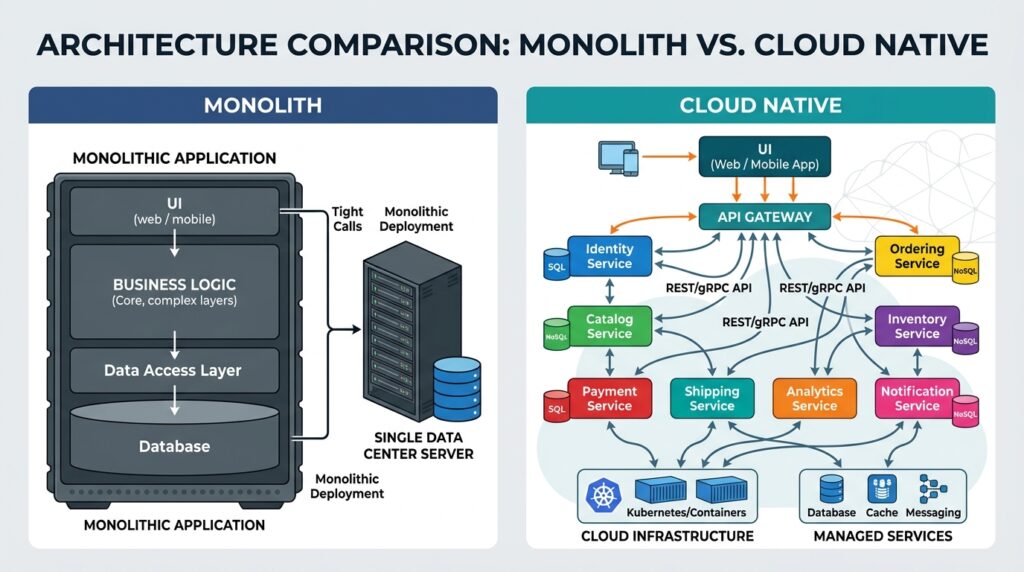
Think about it this way. A traditional application may behave like one large machine. If one part needs an upgrade, the whole system can become difficult to change. A cloud native application is more like a group of smaller services that communicate through defined interfaces.
That structure can make development and scaling easier, but it also introduces more moving parts.
The surprising part is what cloud native does not promise
Cloud native does not automatically make software faster, cheaper, or safer. Poor architecture can remain poor in the cloud.
The Real Reason Cloud Native Apps Scale Differently
Cloud native architecture is closely connected to elastic infrastructure. Instead of buying enough hardware for the biggest expected workload, teams can provision resources as demand changes.
For example, an online store might receive normal traffic during the week and a huge spike during a seasonal sale. With suitable architecture, application components can scale horizontally by adding more instances.
Containers package an application and its dependencies into a consistent unit. Kubernetes can coordinate containers across clusters, handling scheduling, service discovery, and failed workloads.
But wait. Scaling is not only about adding servers. A database or external API can become the bottleneck. Engineers must understand the whole system, not just compute capacity.
When I tested cloud-focused workflows with clients, I noticed this firsthand: the teams that benefited most were not simply the ones using the most cloud services. They were the ones with clear deployment processes, useful monitoring, and realistic scaling requirements.
Did You Know?
Cloud native applications can run on public, private, or hybrid infrastructure. The term describes an approach to building and operating software, not one specific cloud provider.
Cloud Native Makes Frequent Releases Possible, but Automation Does the Heavy Lifting
One major change is how software reaches users. Cloud native teams often connect source control, automated testing, security checks, container builds, and deployment systems through CI/CD pipelines.
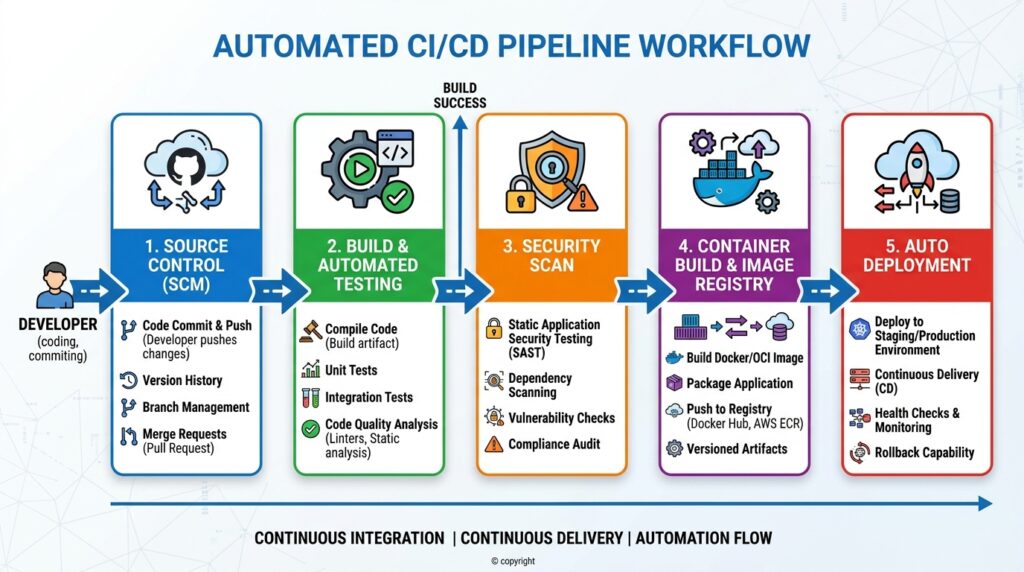
This can reduce manual work. Developers can make smaller changes, test them automatically, and deploy them through repeatable processes. If a release causes trouble, teams may roll back or shift traffic to another version.
Infrastructure as code lets teams define resources in configuration files instead of manually creating everything through a dashboard.
Small services can create a big operational problem
Microservices are often associated with cloud native systems, but they are not mandatory. Breaking one application into many services can make independent releases easier, yet it can also increase operational overhead.
Each service may need logs, metrics, authentication, alerts, backups, and ownership. Without strong observability, teams can struggle to understand failures across several services.
The better question is not, “How many microservices should we create?” It is, “What architecture helps us change and operate this product safely?”
Cloud Native Changes Security and Reliability, Too
A cloud native system can improve resilience when designed correctly. Services may run across multiple instances, while health checks can detect failed workloads.
Yet distributed systems create new failure modes. A network timeout can affect one service while others remain healthy. Credentials can be exposed through a badly configured secret. An overly broad cloud permission can give an application access to resources it never needed.
That is why security should be built into development and deployment processes. Teams commonly use identity and access management, secrets management, encryption, vulnerability scanning, logging, and policy controls.
Reliability also depends on observability. Metrics show what is happening, logs provide events, and traces show how requests move through services.
Cloud native is less about buying cloud infrastructure and more about building systems that can be observed, automated, secured, and changed.
Why Cloud Native Is Becoming the Default for Modern Software
The strongest case for cloud native is that modern software often needs faster delivery, flexible infrastructure, automation, and resilience.
A small startup may use managed services and containers without operating a complex cluster. A large enterprise may use Kubernetes, multiple regions, and extensive automation. Both can follow cloud native principles.
The trade-off is complexity. Cloud native requires new skills and operational discipline. Cloud bills can also grow without usage monitoring.
The bottom line is simple: cloud native designs software around automation, scalability, resilience, and fast change. It is useful when those qualities solve real business problems, not because the label sounds modern.
If you are evaluating an application, ask which part of the system needs to become easier to scale, deploy, or recover?
FAQ’s
1. Is cloud native the same as cloud computing?
No. Cloud computing provides infrastructure and services through cloud platforms, while cloud native describes an approach to designing and operating applications for flexibility, automation, scalability, and resilience. An application can run in the cloud without using cloud native architecture.
2. Does cloud native always mean Kubernetes?
No. Kubernetes is widely used in cloud native environments, but it is not a requirement. Teams can apply cloud native principles with containers, serverless platforms, managed services, automated pipelines, and other tools. The right technology depends on application needs, team skills, and operational complexity.
3. Is cloud native cheaper than traditional software?
Not necessarily. Cloud native systems can reduce manual operations and improve resource flexibility, but they can also introduce extra services, monitoring costs, networking charges, and engineering work. Savings depend on workload patterns, architecture, cloud pricing, and how carefully resources are managed.