


If you’ve spent any time learning SEO, you’ve probably come across the term crawl budget. It often sounds like something only massive websites need to worry about, think e-commerce stores with millions of product pages or large news publishers publishing hundreds of articles every day.
That’s only partly true.
While crawl budget is rarely the biggest SEO challenge for small websites, understanding how it works can help you avoid technical issues that quietly limit your site’s visibility. Many website owners focus on creating content and building backlinks while overlooking whether search engines are efficiently discovering and revisiting their pages.
The good news? You don’t need a huge website to benefit from understanding crawl budget. In fact, knowing the basics can help you build a healthier website from the start and prevent problems as your site grows.
In this guide, you’ll learn what crawl budget is, how Google uses it, when it matters for small websites, common mistakes that waste it, and practical ways to improve your site’s crawl efficiency.
What Is Crawl Budget?
Crawl budget refers to the number of pages a search engine, such as Google, is willing and able to crawl on your website during a certain period.
Think of Googlebot as a visitor with limited time. If your website contains 100 useful pages, Google can usually crawl them without much difficulty. But if your site also contains hundreds of duplicate URLs, broken pages, filter combinations, and unnecessary archives, Google may spend valuable crawling time on pages that offer little value.
In simple terms:
- Crawling means Google discovers and visits pages.
- Indexing means Google stores those pages in its search index.
- Ranking happens after indexed pages are evaluated for search results.
Many people confuse crawling with indexing, but they’re different steps. A page can’t usually be indexed until it’s been crawled first.
How Does Crawl Budget Work?
Google’s approach to crawl budget is mainly influenced by two factors.
Crawl Capacity Limit
Google doesn’t want to overload your server.
If your website responds quickly and reliably, Google can crawl more pages.
If your server becomes slow or returns frequent errors, Google may reduce its crawling rate to avoid causing problems.
Imagine two websites:
Website A
- Loads in under one second
- Rarely returns errors
- Has reliable hosting
Google comfortably crawls hundreds of pages.
Website B
- Frequently times out
- Produces server errors
- Responds slowly
Google gradually reduces crawling to protect the server.
Crawl Demand
Not every page deserves the same attention.
Google prioritises pages that appear important.
Examples include:
- Frequently updated blog posts
- New product pages
- Popular articles with backlinks
- Trending news content
Older pages that haven’t changed in years may be crawled less frequently.
This doesn’t mean they’re unimportant, it simply reflects Google’s attempt to use resources efficiently.
Does Crawl Budget Matter for Small Websites?
This is where many SEO discussions become misleading.
For most small websites, crawl budget is not a major limitation.
If your website has:
- 50 pages
- 200 pages
- 500 pages
Google can usually crawl everything without difficulty.
Google itself has stated that crawl budget generally isn’t something smaller websites need to worry about.
However, understanding crawl budget still matters because technical issues can waste Google’s crawling resources, even on relatively small sites.
Consider this example.
A local plumbing business has:
- 80 service pages
- 30 blog articles
Perfectly manageable.
But the website also accidentally creates:
- Thousands of filtered URLs
- Duplicate category pages
- Unnecessary search-result pages
- Endless calendar archives
Instead of crawling 110 useful pages, Google now encounters several thousand URLs.
The result?
Important pages may be crawled less efficiently.
What Can Waste Crawl Budget?
Several technical issues can reduce crawl efficiency, even on relatively small websites.
Duplicate Content
Duplicate pages often appear without website owners noticing.
Examples include:
- HTTP and HTTPS versions
- www and non-www versions
- URL parameters
- Printer-friendly pages
- Duplicate product variations
While Google can often recognise duplicates, excessive duplication still creates unnecessary crawling work.
Broken Pages (404 Errors)
A few 404 pages are completely normal.
Hundreds of broken URLs, however, force search engines to repeatedly check pages that no longer exist.
For example, a website deletes dozens of old blog posts but leaves internal links pointing towards them. Google continues discovering those dead URLs.
Redirect Chains
Redirects are useful.
Long redirect chains are not.
Example:
Page A -> Page B -> Page C -> Page D
Instead of reaching the destination immediately, Google has to follow several steps.
Multiply that across hundreds of URLs and crawling becomes less efficient.
Thin or Low-Value Pages
Some websites automatically generate pages that provide little value.
Examples include:
- Empty category pages
- Tag pages with one post
- Internal search results
- Duplicate author archives
- Empty pagination pages
These pages consume crawling resources without contributing much to search visibility.
Infinite URL Combinations
This issue commonly affects e-commerce websites.
For example:
/shoes?colour=black&size=9&brand=nike&sort=price&page=2
Now imagine dozens of filter combinations.
One product category can suddenly generate thousands of URLs.
Signs Your Website May Have Crawl Issues
Even smaller websites can experience crawling problems.
Watch for signs like:
- New pages taking weeks to appear in Google
- Important pages remaining unindexed
- Large numbers of “Discovered – currently not indexed” pages in Google Search Console
- Server errors during crawling
- Significant differences between submitted and indexed pages
These don’t automatically mean crawl budget is the problem, but they’re worth investigating.
How to Improve Crawl Budget
The goal isn’t to increase crawl budget directly.
Instead, make your website easier for search engines to crawl efficiently.
Improve Site Speed
Fast websites are easier to crawl.
Focus on:
- Image optimisation
- Browser caching
- Efficient hosting
- Code minification
- Reducing unnecessary JavaScript
A faster site benefits both users and search engines.
Maintain a Clean Site Structure
A simple architecture helps Google discover pages naturally.
Example:
Home
│
├── Services
├── SEO
├── PPC
└── Web Design
│
├── Blog
├── SEO Tips
├── Local SEO
└── Technical SEO
Avoid burying important pages six or seven clicks deep.
Fix Broken Links
Regularly audit your website for:
- Broken internal links
- Unnecessary redirects
- Deleted pages
- Outdated navigation
Simple maintenance improves crawl efficiency.
Use XML Sitemaps Correctly
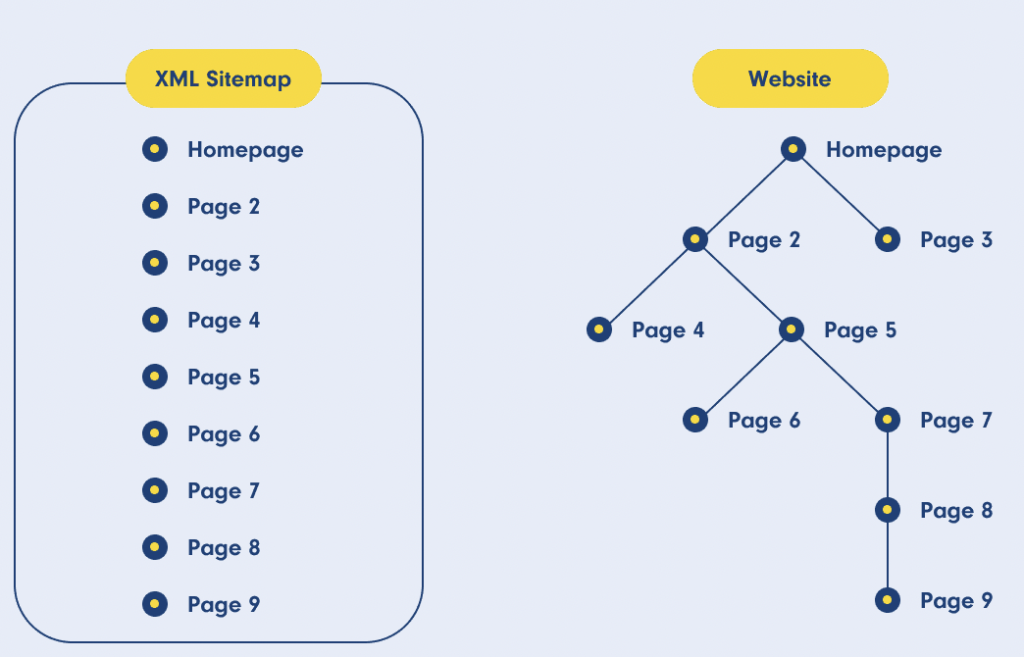
An XML sitemap doesn’t force Google to crawl pages.
Instead, it acts like a roadmap.
Include:
- Important pages
- Updated content
- Canonical URLs
Avoid including:
- Redirects
- Noindexed pages
- Broken pages
Control Crawling and Indexing
Not every page needs to be crawled or indexed.
Examples include:
- Admin areas
- Staging environments
- Duplicate search pages
- Internal search results
Use robots.txt carefully to manage crawling where appropriate, and use meta robots directives when you want pages crawled but not indexed.
Strengthen Internal Linking
Internal links help Google discover content naturally.
Instead of leaving valuable articles isolated, connect related topics.
For example, an article about technical SEO could naturally link to:
- XML sitemap guide
- Website architecture guide
- Canonical tags explanation
- Robots.txt tutorial
This improves both crawling and user navigation.
Real-World Example
Imagine two gardening blogs with around 250 articles each.
Blog One
The owner keeps things tidy:
- Clean URLs
- Logical categories
- Updated sitemap
- Fast hosting
- Strong internal linking
Google crawls new articles within hours or days.
Blog Two
The second blog has accumulated technical clutter over several years:
- Thousands of tag pages
- Duplicate archives
- Slow shared hosting
- Broken links
- Unnecessary redirects
- Parameter-generated URLs
Although both sites have a similar amount of content, the second blog wastes crawler resources on pages that offer little value. New articles may take longer to be discovered, and technical issues become harder to diagnose.
The difference isn’t simply crawl budget, it’s crawl efficiency.
Common Crawl Budget Myths
“Every Small Website Has a Crawl Budget Problem”
False.
Most small websites never encounter crawl budget limitations.
“Submitting a Sitemap Guarantees Indexing”
No.
A sitemap helps Google discover pages, but Google still decides whether they deserve indexing.
“Publishing More Content Automatically Improves Crawling”
Not necessarily.
Publishing hundreds of low-quality pages can create the opposite effect.
Quality consistently outperforms quantity.
“Deleting Pages Always Improves Crawl Budget”
Only if those pages truly offer no value.
Removing useful evergreen content simply reduces your website’s overall value.
Practical Steps for Small Website Owners
If your site has fewer than a few hundred pages, focus on the fundamentals before worrying about crawl budget.
A sensible routine includes:
- Monitor indexing in Google Search Console.
- Fix broken internal links regularly.
- Remove or consolidate duplicate content.
- Keep your XML sitemap accurate.
- Improve website speed.
- Build a logical internal linking structure.
- Avoid creating unnecessary low-value pages.
- Review technical SEO issues every few months rather than waiting for problems to pile up.
These improvements support both crawling and the overall user experience.
Internal Linking Opportunities
If you’re building a content hub around SEO, consider linking this article to related resources using natural anchor text such as:
- Technical SEO checklist
- How Google indexes websites
- XML sitemap best practices
- Robots.txt explained
- Canonical tags guide
- How to fix crawl errors
- Website architecture for SEO
- Internal linking strategy
- Google Search Console tutorial
Conclusion
For most small websites, crawl budget isn’t the first SEO issue to solve. Content quality, search intent, site structure, and backlinks usually have a much greater impact on rankings.
That said, understanding crawl budget gives you a valuable technical advantage. By keeping your website clean, eliminating unnecessary URLs, fixing crawl obstacles, and maintaining a sensible internal linking strategy, you make it easier for search engines to discover the pages that matter most.
Google’s official documentation provides the most reliable explanation of how crawling works and when crawl budget becomes important. Crawling infrastructure.
Think of crawl budget as a matter of efficiency rather than scarcity. The goal isn’t to get Google to crawl more pages, it’s to ensure the time Google spends on your website is focused on your most valuable content. As your site grows, those good habits become increasingly important.
Frequently Asked Questions
1. What is crawl budget in SEO?
Crawl budget is the number of pages a search engine is willing and able to crawl on your website within a given period. It’s influenced by your site’s technical health and the importance Google assigns to your content.
2. Does crawl budget matter for small websites?
Usually not. Most websites with only a few hundred pages don’t face crawl budget limitations. However, technical issues such as duplicate URLs, broken links, and low-value pages can reduce crawl efficiency.
3. What is the difference between crawling and indexing?
Crawling refers to the method by which search engines find and explore web pages across the internet. Indexing is the process of storing and analysing those pages so they can appear in search results.
4. How can I check if my website has crawl issues?
To identify any issues with how your website is being explored or indexed, utilize Google Search Console. Specifically, examine the Pages report, Crawl Stats, and Indexing reports to spot any errors or delays in the crawling and indexing process.
5. Can improving site speed help crawl budget?
Yes. Faster websites generally allow Googlebot to crawl pages more efficiently because the server responds quickly and reliably.
6. Should I block duplicate pages with robots.txt?
Not always. In many situations, canonical tags or a noindex directive are more appropriate. The best solution depends on the type of duplicate content and your indexing goals.
7. How often does Google crawl a website?
There is no fixed schedule. Frequently updated, authoritative websites may be crawled several times a day, while smaller or less active sites may be crawled less often.